Professional Design
Made Simple

A powerful canvas editor with advanced layer management, precision tools, and professional-grade brushes. Access 200M+ design assets and create stunning graphics with an intuitive interface designed for both professionals and enthusiasts.

No installation • Cloud-based • Professional & Beginner Friendly

No credit card required • Free forever plan available

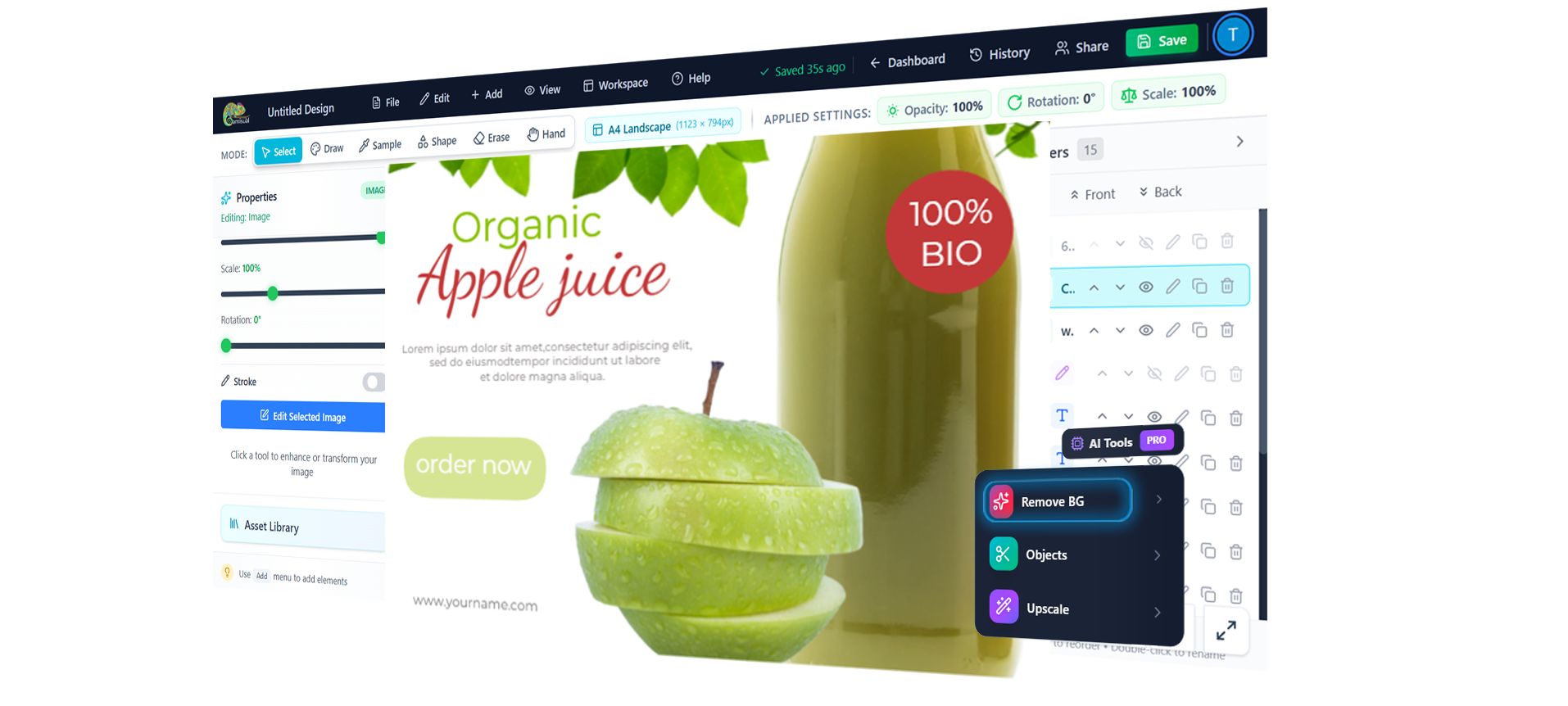
Camisual Design Editor - Professional Background Removal

Trusted by Businesses Worldwide

Real companies using Camisual in daily workflows

Sydney, Australia

Stuarth Firth

CEO

Pitch Prfct favicon

Pitch Prfct

pitchprfct.com
US flag

Miami, Florida, USA

Jake Triton

CEO

Aladdin Houston favicon

Aladdin Houston

aladdinhouston.com
US flag

Houston, Texas, USA

Ali Nahhas

CEO

Recasoft favicon

Recasoft

recasoft.no
NO flag

Fornebu, Norway

Sheraz Baloch

CEO

Powerful Features

Tools That Actually Save You Time

Each feature is designed with one goal: make your workflow faster, easier, and more creative.

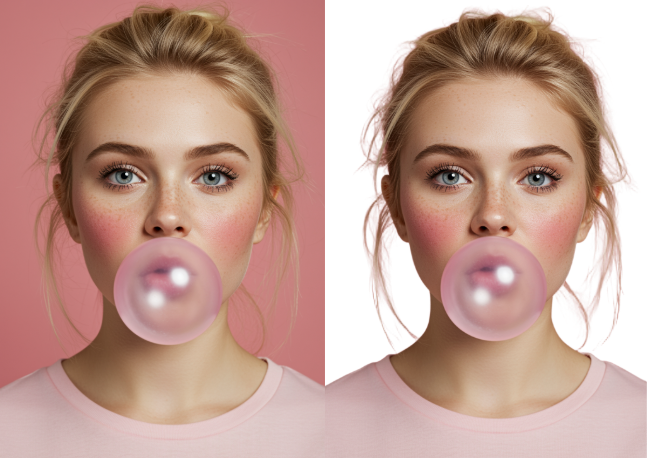
Background Removal Demo
Before
After
AI Background RemoveAI Upscale
AI-Powered

Background Removal & Image Enhancement

Why it's the best:

One-click background removal with precision edge detection. Plus built-in enhancement tools and AI upscaling to improve image quality instantly.

The difference:

Remove backgrounds, enhance colors, and upscale resolution all in one tool. No jumping between apps or external services.

Why this matters:

Product photography, portraits, profile pictures they all need clean backgrounds. Instead of manually tracing edges with selection tools or outsourcing to removal services, get professional results instantly. Then enhance brightness, colors, and resolution without switching apps.

All-in-One

Image Enhancement Built Right In

Why it's the best:

Adjust exposure, contrast, saturation, and more without leaving your canvas. No round-trips to photo editors.

The difference:

Stop opening images in external editors. Everything from basic adjustments to AI enhancement is built in.

Why this matters:

Traditional workflows mean importing an image, realizing it needs adjustments, opening a photo editor, making changes, saving, re-importing, and repeating. Our built-in image editor eliminates that cycle adjust brightness, contrast, colors, and apply filters directly on your canvas as you work.

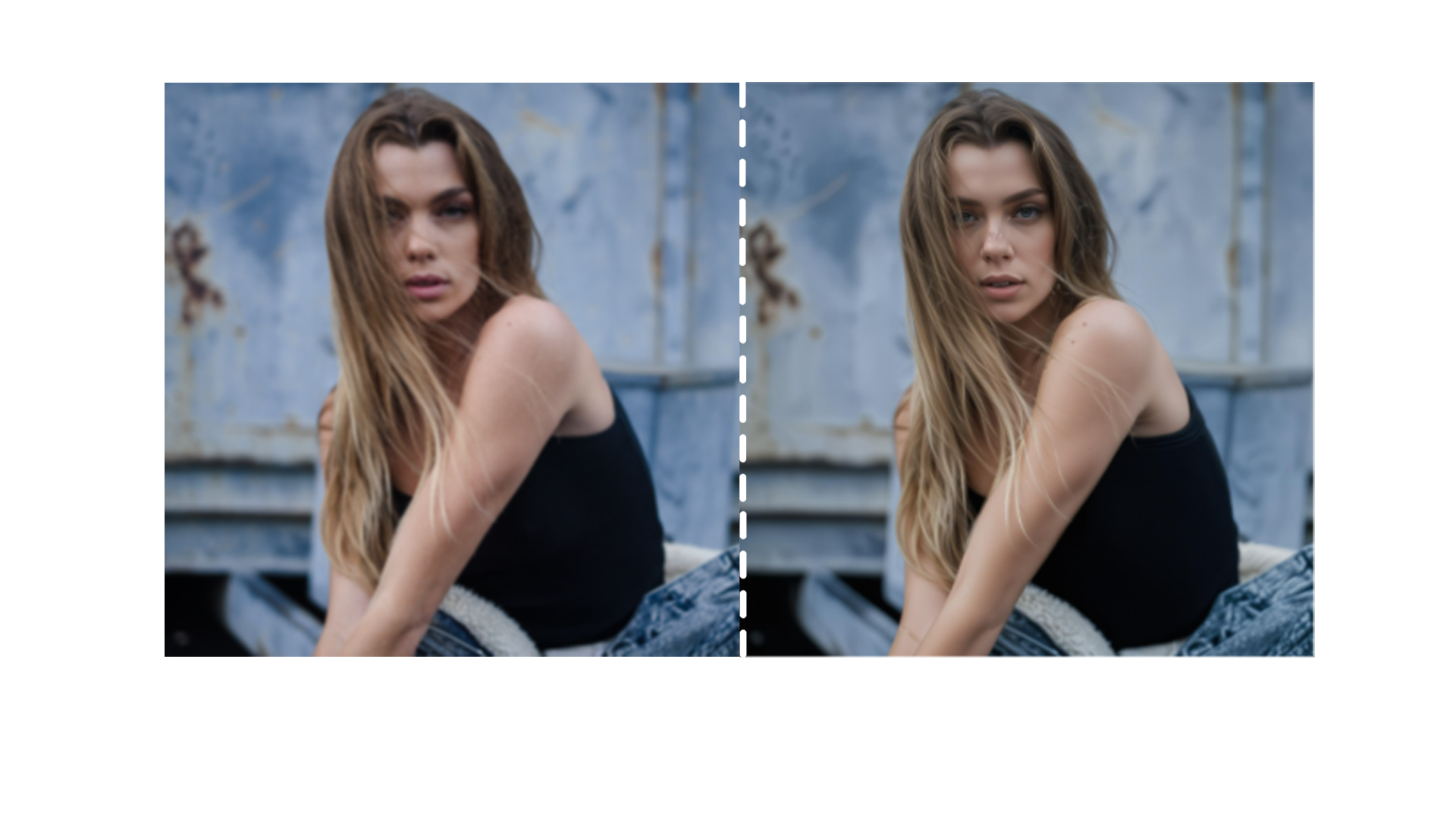
Image Enhancement Demo
Before
After
Auto EnhanceAI UpscaleSuper ResolutionFiltersVibranceTintDefinitionNoise Reduction
Brush Stroke Examples
Pressure SensitiveRoundCalligraphySprayPencilMarkerCustom SizeOpacity Control
Artist-Grade

Brushes That Feel Natural

Why it's the best:

Pressure-sensitive, smooth, and responsive. Our brush engine rivals dedicated painting software.

The difference:

Digital art tools have great brushes but lack design features. Design tools have weak brushes. We have both.

Why this matters:

You shouldn't need separate apps for sketching and designing. Our professional brush engine gives you the natural feel of painting software combined with the precision of design tools sketch ideas, paint textures, and add finishing touches without ever leaving your workspace.

AI-Powered

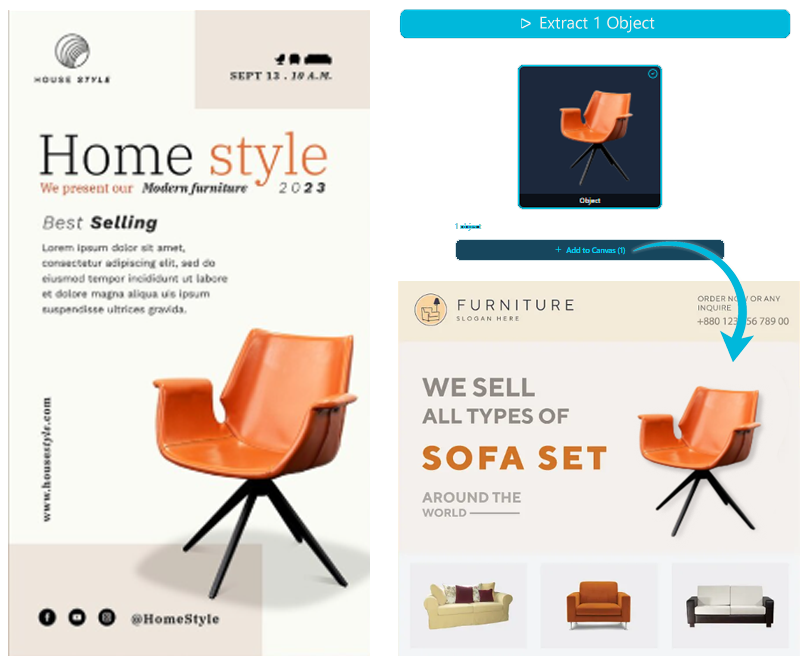
Object Removal That Actually Works

Why it's the best:

Simply paint over unwanted objects and watch them disappear. No complicated selections, masks, or content-aware fill struggles.

The difference:

Other tools require you to make perfect selections and hope the AI guesses right. We let you guide the AI with simple brush strokes.

Why this matters:

Traditional object removal means fighting with clone stamp tools, spending minutes on selections, or dealing with awkward content-aware fill results. Our AI-guided approach lets you paint over anything you want gone people, objects, blemishes and get clean, natural looking results in seconds, not minutes.

Object Removal Demo
Draw Around ObjectMultiple ObjectsBrush to RemoveOne ClickNatural FillSmart Detection
Vector Power

Every Shape is Fully Customizable

Why it's the best:

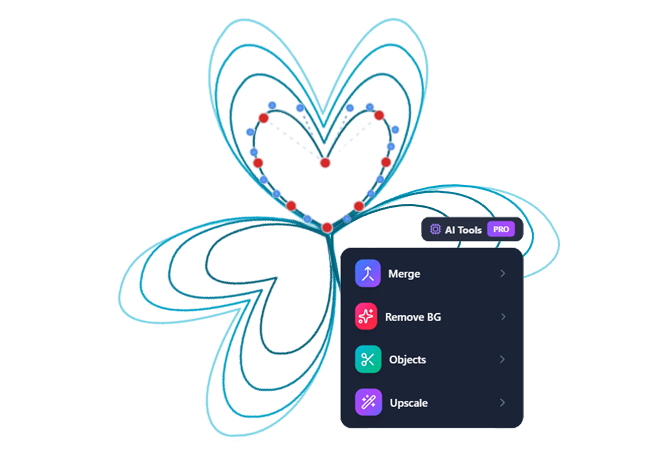
Start with a rectangle, curve it into whatever you need with bezier handles. No need to draw from scratch or use multiple tools.

The difference:

In other tools, you'd need the pen tool, shape tool, and pathfinder. We give you one tool that does everything.

Why this matters:

Most design tools force you to choose between simple shapes or complex pen tool drawing. Our bezier-powered shapes let you start simple and evolve your design naturally curve any corner, adjust any edge, transform basic shapes into custom graphics without switching tools or starting over.

Custom Curved Shape
Bezier CurvesCorner RadiusRotateFlipDuplicateUnionSubtractIntersect
Why Choose Us

One Tool. Infinite Possibilities.

Stop juggling between multiple design tools. Camisual gives you everything in one powerful, intuitive platform.

All-in-One

5 Tools → 1 Tool

What takes multiple applications elsewhere, we do in one seamless workflow. No more switching, exporting, importing.

Professional

Simple Yet Professional

Beginners create stunning designs in minutes. Professionals get the power they need. Same tool, any skill level.

AI-Assisted

AI + Human = Perfect

We believe AI assists, humans create. Get AI-powered tools that enhance your creativity, not replace it.

About Camisual

The Editor That Adapts to You

Camisual is more than just a design tool it's a creative platform built for everyone, from complete beginners to professional designers. We believe powerful design software shouldn't require a steep learning curve or expensive subscriptions.

Our mission is simple: make professional design accessible to everyone. Whether you're NOT a professional designer or a business owner who needs marketing materials, Camisual gives you the tools you need without the complexity you don't.

We believe AI + Human cooperation makes perfect design. Our AI-assisted tools enhance your creativity without replacing it. You're the designer, AI just handles the tedious tasks.

Built with modern web technologies, Camisual runs entirely in your browser no downloads, no installations, just instant access to professional-grade design tools from any device. The editor adapts to you, whether you're a beginner or a pro.


Growing
Community
200M+
Design Assets
50+
Tools

AI-Assisted, Not AI-Powered

We're not an AI tool - we're a professional design platform with AI features that assist your creativity. You stay in control.

Professional Features

Layer management, bezier curves, custom brushes, and all the tools pros need.

Team Collaboration

Work together, share feedback, and create amazing designs as a team.

Lightning Fast

Optimized for performance, responsive interface, and instant cloud sync across devices.

Everything You Need

From workspace presets to advanced tools, we've thought of everything

Workspace & Organization

Folder SystemOrganize projects
Social Media PresetsInstagram, Facebook, etc
Print PresetsA4, Letter, Custom
Web PresetsBanners, thumbnails
Cloud SyncWork anywhere

Core Design Tools

Advanced Layers
Vector Shapes + Beziers
Professional Text
Custom Brushes
Color Picker
Transform Tools

AI-Powered Features

Background Removal
Object Removal
Auto Enhancement
Super Resolution
Smart Upscale

Professional Tools

Grid System
Precision Rulers
History Panel
Layer Visibility
Object Locking
Smart Crop

Asset Library

200M+ Design AssetsPhotos, vectors, templates & more
NEW

Collaboration & Export

Team CollaborationWork together
Share Preview LinksGet feedback instantly
PNG, JPG, SVG, PDF
High-DPI Export
Folder Management

No credit card required • Free forever plan available

For Everyone

Built for Everyone

From your first design to your thousandth masterpiece one tool that grows with you

Beginners & Enthusiasts

Start creating in minutes

  • No design experience needed
  • Intuitive drag-and-drop interface
  • Pre-made templates to start fast
  • Learn while you create

Professional Designers

Power tools for pros

  • Professional-grade precision tools
  • Advanced layer management
  • Custom keyboard shortcuts
  • Bezier curve editing & vector tools

Social Media Creators

Create content faster

  • Pre-sized for all platforms
  • Quick variations & batch export
  • Brand kit & color palettes
  • Collaborate with your team

Business Owners

Save time and money

  • Create marketing materials in-house
  • No expensive design software
  • Professional results, zero experience
  • Save thousands on outsourcing

Ready to Create Something Amazing?

Join thousands of creators who are already making professional designs with Camisual

Our Philosophy

AI + Human = Perfect Design

We don't believe AI replaces designers. Camisual believes AI empowers them.

Not Just AI

Pure AI tools create generic, template-based designs. They lack the human touch, creativity, and uniqueness that makes great design.

AI-Assisted Creation

Our AI handles the tedious tasks (background removal, object cleanup) while you focus on creativity. You're still the designer.

"The future of design isn't AI replacing humans it's AI amplifying human creativity."

Pricing

Simple, Transparent Pricing

Start free. Upgrade when you need more power.

Free

Core tools, no card needed

Pro

AI features + team tools

See all plans
FAQ

Frequently Asked Questions

Everything you need to know before getting started

Is Camisual free to use?+
Yes. Camisual offers a free forever plan with access to core design tools: the canvas editor, layers, brushes, shapes, text tools, and background removal. Premium plans unlock more AI credits, higher export quality, and full team collaboration. No credit card required to start.
Do I need to download or install anything?+
No. Camisual runs entirely in your web browser (Chrome, Safari, Firefox, or Edge). No installation, no plugins. Open a tab and start designing instantly on any device, including Mac, Windows, and tablets.
Can I remove image backgrounds for free?+
Yes. AI background removal is available on the free plan. Upload your image, click remove background, and download the result with a transparent background. No selection tools or manual masking needed.
Is Camisual good for beginners with no design experience?+
Absolutely. The interface is built to be intuitive from day one. Drag-and-drop elements, pre-made templates, and context-aware toolbars mean you can create professional-looking designs without any design training or prior experience.
How does Camisual compare to Canva or Photoshop?+
Camisual bridges the gap between the two. It's as easy to start as Canva but includes deeper creative tools: professional pressure-sensitive brushes, bezier curve editing, pixel-level object removal, and full layer management. Features typically reserved for Photoshop or Illustrator, available in a browser for free.
Can I use Camisual for commercial projects or client work?+
Yes. Designs you create in Camisual are yours to use commercially. For stock images or assets sourced from the built-in 200M+ asset library, please review the individual asset license shown at the time of use.
What file formats can I export to?+
You can export your designs as PNG, JPG, SVG, and PDF. High-DPI / retina-quality export is supported for print-ready output. PNG with transparent background is available on all plans.
Does Camisual support team collaboration?+
Yes. You can invite team members to your designs, share read-only preview links with clients, leave comments for feedback, and manage all projects in shared folders. No separate file-sharing tools needed.

Still have questions? Contact our team

Early Adopter Feedback

What Our Users Say

Honest feedback from our early users

We love hearing from our community ❤️

"I'm not a designer at all, but I needed to make product photos for my Etsy shop. The background removal just... works? Like magic honestly."

Glen M.

Glen M.

Etsy Shop Owner

"Been using Photoshop for years. This obviously doesn't replace it, but for quick edits and social content? Way faster. I actually like using it."

MT

Math. T

Freelance Designer

"The asset library is huge. I used to spend 20 mins finding free icons, now it's just... there. Small thing but saves so much time."

Josh R.

Josh R.

Marketing Manager

"Tried a bunch of browser-based tools, most feel like toys. This one actually has proper layers and brushes. Impressed tbh."

JK

JK

Digital Artist

Ready to Start Creating?

Join designers who've simplified their workflow and supercharged their creativity.

Free to start, upgrade anytime
No credit card required
Cloud-based, work anywhere
Cancel anytime, no questions
SC
Emma Rodriguez
MT
Jordan Kim
TL

Join our growing community of creators

Start creating in less than 60 seconds